A plain-language guide for sellers who want to know which independent stores a price tracker can read
Schema.org Product Data: The Broadest Path for Store Monitoring

Two independent stores can look identical in a browser and behave completely differently in a price tracker. One captures cleanly on the first try: product name, image, price, currency, availability. The other returns nothing useful, and it is tempting to blame the app. The difference is usually invisible: one store publishes a machine-readable product label inside its page code, and the other does not.
That label is Schema.org structured data, the shared vocabulary the web uses to describe products, prices, and offers. Understanding how it works explains the broadest path for store monitoring: why many independent stores can be tracked without a custom parser for each one, what a tracker actually reads, and where the label can mislead you. This article covers both sides using Price Recon's Schema.org product path as the practical example.
A product label written for machines, not shoppers
When a store builds a product page, it writes two versions of the same facts. The visible version is what you read: the title, the photo, the price under the buy button. The machine version describes the same facts in a standard way that software can parse reliably. That standard is maintained at schema.org, where a product has standard fields such as name, image, and offers — and where each offer carries a price, a currency code, and an availability status such as in stock or out of stock.
Stores publish this label mainly for search engines, which is what makes it so useful for monitoring: the data already exists on the page, even though no shopper ever sees it. Schema.org's own usage statistics, based on Google's web index, report the Product type across more than ten million domains.
Two formats dominate in practice:
- JSON-LD — a self-contained block of structured data added to the page, usually by the store's platform. Shoppers never see it.
- Microdata — small labels added directly to the page's existing content elements, so the machine-readable values live inside the visible markup.
Both formats describe the same product facts. A tracker that reads either one gets the same record: a name, an image, a price with a currency, and an availability status. That shared shape is what makes generic store monitoring possible.
How Price Recon reads the structured-data signal
For stores that are not handled by a source-specific path, Price Recon takes the generic route: it fetches the page with an ordinary HTTP request first, and if the useful content appears only after JavaScript runs, it falls back to a headless, JavaScript-capable WebView to let the page render.
Once it has the document, extraction follows a simple order:
- If the page contains JSON-LD structured data, the app reads the product entry from it. It tolerates common generator mistakes, such as stray quotes or unescaped line breaks in descriptions, before giving up on a block.
- If there is no usable JSON-LD, it reads the microdata labels embedded in the page's content elements.
- Whichever source wins is turned into one local product record: name, product URL, image, store icon, price, currency, and availability.
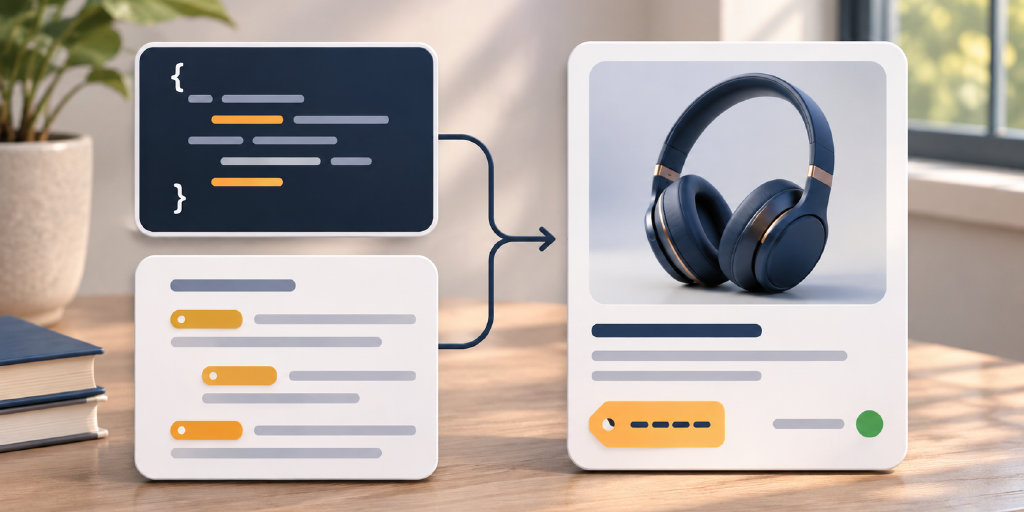
Two additions make the record more recognizable. The store icon is taken from the page when available. And if the structured data has no usable product image, the app falls back to the image the page itself declares as its product image. A store with incomplete structured data can therefore still produce a clean, recognizable record.
One detail worth knowing: a page can embed several offers. When multiple offers exist, Price Recon prefers an offer marked for a single unit and otherwise uses the first offer listed. The captured price is therefore one offer the store published — not a complete table of every seller or quantity tier on the page.
What structured data lets you monitor
Once a product record exists, monitoring no longer depends on that store's layout. Because the values come from a standard label, repeated checks can read the same fields over time: Price Recon stores price history, detects whether the tracked price moved up or down, and recognizes availability transitions. You can configure local notifications for price increases, decreases, and items becoming available or unavailable — separately, per product.
This is why Schema.org price monitoring reaches so broadly: one generic reading method covers many independent stores at once, instead of requiring a hand-built parser for every shop. The stores do the heavy lifting by publishing the standard, and the tracker reuses work the stores already did for search engines.
Two honest boundaries apply. First, broad does not mean universal: a store that publishes no structured data, or publishes broken markup, may not produce a usable record. Second, this is a local-first workflow: your tracked products, price history, and settings stay in device-only storage, and alerts are local notifications — there is no cloud copy of your watchlist. Scheduled checks run within operating-system constraints and always depend on the store's response.
When the label lies: incomplete or misleading markup
The structured-data label is maintained by the store, and nothing forces it to match the page you see. Treat every captured value as what the page declared, not as a verified fact about the business. Four situations deserve extra care.
The markup is not the visible page
The price rendered on the page can differ from the marked-up price. A store may show a sale price computed after the page loads, apply member or regional pricing, or leave an outdated value in the markup. If the label and the visible page disagree, a tracker that reads the label records the label's version. Compare the first capture with the live page before you rely on the number.
Which offer is "the price"?
Some stores publish a price range instead of a single price — a lowest and a highest value, sometimes with a count of sellers. Marketplaces can also publish one price per seller. The generic path reads the product's offers and selects one of them — the single-unit offer when one is marked, otherwise the first listed. If the offer you care about is a specific seller, a specific condition, or a quantity tier, confirm it on the source page.
Availability is a code, not a promise
Schema.org availability is a small set of status values, such as in stock, out of stock, and pre-order. Price Recon treats a value marked as in stock as available and everything else as not available. If a store forgets to update its label when stock runs out, the tracker faithfully repeats the store's stale claim. And a page with no availability value at all is not proof of a stockout — it simply exposes no signal.
Variants and missing currencies
Variant-heavy products can expose a single product entry that describes one variant, often the default. The URL you track determines which product the record represents, so keep the full, variant-specific link. Currency is similar: the standard expects a currency code such as USD or EUR. A page that omits the currency code leaves a price without a reliable currency label, and no tracker can safely invent one.
Check a page's product data before adding a high-value URL
A five-minute manual check tells you whether a store is likely to be monitorable before you build a workflow around it:
- Open the product page and view its source. Search for
application/ld+jsonoritemscope. - If you find it, look for the product entry and compare its name, price, currency, and availability with what the visible page shows.
- If neither format is present, the page may not expose structured data, and the generic path may fail. Treat the store as unknown until the app's first capture proves otherwise.
- Optionally, run the URL through Schema.org's own validator to see exactly what product data the page declares.
- Add the URL in Price Recon and compare the first captured record with the live page before saving decisions against it.

This check pays for itself on high-value URLs: products whose price or availability changes affect real decisions, or stores you plan to check repeatedly for weeks. Five minutes of verification now prevents building a watchlist on values that were wrong from the start.
A workflow for monitoring independent stores
- Collect URLs from the independent stores you already check by hand.
- Spot-check the markup for the items that matter most, using the steps above.
- Add and review each product. Compare the captured name, image, price, currency, and availability with the live page, and add a note when a variant or seller context matters.
- Set alert conditions per product: price up for cost protection, price down for sourcing opportunities, availability changes for stock risk.
- Review on a rhythm. When a record changes, open the source page and confirm the current offer before acting.
Expect some stores to fail: markup can change during a redesign, some pages publish nothing readable, and anti-bot responses can block automated visits. A failed check is a signal to review the source page, never a confirmed price or stock change.
The broadest path, not a universal promise
Schema.org Product data is the broadest path for store monitoring because the work is already done: stores publish a shared, machine-readable label for search engines, and a tracker that understands the standard can reuse it across thousands of independent shops.
The honest promise is narrower than "every store works." It is this: many independent stores become monitorable with one generic path, as long as their label is present and truthful — and the trustworthy workflow always verifies the label against the live page before acting on it.
Start monitoring the independent stores that matter with Price Recon, and spend the first five minutes of each high-value URL verifying its product data.